Contributing#
This guide covers the development workflow, testing, code style, and other requirements to contribute to icalendar-anonymizer.
Prerequisites#
You’ll need to first install prerequisites on, and clone the icalendar-anonymizer repository to, your local computer.
Tests, code formatting, and documentation builds and checks require that you install GNU Make, uv, and Git.
Note
uv handles the installation of Python and all dependencies for icalendar-anonymizer.
Make#
Make is used to provide an interface to developers to perform repetitive tasks with a single command.
Make comes installed on most Linux distributions. On macOS, you must first install Xcode, then install its command line tools. On Windows, it’s recommended to Install Linux on Windows with WSL, which will include Make.
Finally, it’s a good idea to update your system’s version of Make, because some distributions, especially macOS, have an outdated version. Use your favorite search engine or trusted online resource for how to update Make.
uv#
uv is used for installing Python, creating a Python virtual environment, and managing dependencies for documentation.
Install uv. Read the console output for further instructions, and follow them, if needed.
curl -LsSf https://astral.sh/uv/install.sh | sh
powershell -ExecutionPolicy ByPass -c "irm https://astral.sh/uv/install.ps1 | iex"
Git#
Install Git for your operating system.
Configure Git#
Unless you’re a maintainer or administrator, you don’t have write access to push commits to GitHub repositories under the pycalendar organization or the icalendar-anonymizer repository. You can, however, push commits to your fork. Thus, a typical workflow will be circular in nature. You’ll pull code from the upstream icalendar-anonymizer repository, push your work from your local clone to your remote fork, then make a pull request from your fork to the upstream icalendar-anonymizer repository.
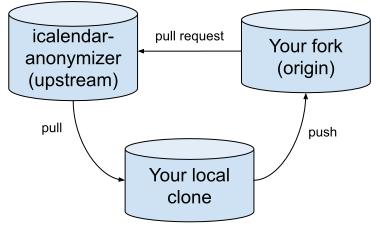
Start by forking icalendar-anonymizer’s repository to your account through the GitHub interface.
See also
Configure Git to sync your fork with the upstream repository.
Install icalendar-anonymizer for development#
Change your directory to your local clone.
cd icalendar-anonymizer
Install icalendar-anonymizer for development—including all of its dependencies for tests, documentation, and formatting code, as well as a Python virtual environment—with the following command.
make dev
Development workflow#
This section covers the general development workflow. Subsequent sections go into more detail.
Follow these steps from the root of your clone.
Check out the
mainbranch, update it locally, and create a branch from it.git checkout main git pull origin main git checkout -b feature-name
Write your code changes, corresponding tests, docstrings, and narrative documentation. All new features must include tests and documentation.
Run tests. You can pass any options that pytest supports as an environment variable or argument
TESTOPTS.make test
Build documentation and view a live preview in a web browser.
make livehtmlCheck links in documentation.
make linkcheckbrokenCheck spelling, style, and grammar in narrative documentation.
make valeLint and format code.
make lint-check  # Check for linting errors
make lint-fix    # Auto-fix linting errors
make format      # Format code
Commit your changes, using the Conventional Commits message format that follows Commit Message Format.
git add .
git commit -m "feat: add new feature description"
Push your changes to GitHub.
git push origin feature-name
Open a pull request on GitHub.
Run tests#
This section describes how to run tests.
Run all tests#
make test
Run tests with coverage#
make coverage
The test coverage report will be in htmlcov/index.html.
Test requirements#
All tests must satisfy the following requirements.
A minimum of 90% coverage is required and enforced by continuous integration (CI).
All tests must pass.
All new features and bug fixes must have tests.
Use parametrized tests to reduce duplication, as described in Test organization.
CI test matrix#
Continuous integration runs tests on the matrix cross-product of the following parameters.
Python versions 3.11, 3.12, and 3.13
Ubuntu, Windows, and macOS operating systems
This creates nine test jobs. Tests must pass across the entire matrix.
Code quality#
Use Ruff for linting and formatting code. Ruff is configured to limit line length to one-hundred characters.
Check for lint errors#
make lint-check
Fix lint errors#
make lint-fix
Format code#
make format
Configuration#
Ruff settings are in pyproject.toml under the [tool.ruff] table.
CI enforces the same Ruff version as that used in development.
pre-commit hooks#
pre-commit hooks catch issues before committing, providing feedback faster than waiting for CI.
These are installed automatically when creating a development environment.
The hooks are defined in .pre-commit-config.yaml.
What runs on every commit#
Code lint
Code format
REUSE compliance validates SPDX license headers
File integrity checks:
Trailing whitespace removal
End-of-file fixer
YAML, JSON, and TOML syntax validation
Python AST check
Case conflict check
Merge conflict detection
Large file prevention, configured to detect files larger than 1MB
Line ending normalization to
LFDebug statement detection
Commit message validation, enforcing Conventional Commits format
Performance#
All checks complete in under five seconds.
Run pre-commit manually#
You can run pre-commit manually.
Run all hooks on all files.
make pc

pre-commit run ruff --all-files  # Run specific hook
Skip hooks#
For work-in-progress commits, you can skip pre-commit hooks with the following command. Use it sparingly.
git commit --no-verify
Note
pre-commit is optional for contributors. CI enforces the same checks regardless. Core maintainers should use it.
Code style guidelines#
This section describes guidelines for writing code in icalendar-anonymizer.
Docstrings#
Use Google-style docstrings with multi-line format:
def foo(arg1: str, arg2: int) -> str:
    """Brief description on first line.

    More detailed explanation if needed. Can span multiple paragraphs.

    Args:
        arg1: Description of first argument
        arg2: Description of second argument

    Returns:
        Description of return value

    Raises:
        ValueError: When invalid input provided
    """
Include an Examples section only with real, testable doctests.
Test organization#
Use pytest.mark.parametrize for duplicate test patterns:
@pytest.mark.parametrize(
    ("property_name", "expected_value"),
    [
        ("status", "CONFIRMED"),
        ("priority", 1),
    ],
)
def test_preserves_metadata(property_name, expected_value):
    """Test implementation."""
Organize tests into logical groups with clear section comments.
Imports#
Standard library imports first
Third-party imports second
Local imports third
Sort alphabetically within each group
# Standard library
import hashlib
from datetime import datetime

# Third-party
from icalendar import Calendar

# Local
from icalendar_anonymizer import anonymize
Line length#
The maximum line length for code is 100 characters maximum. It is enforced by Ruff.
Documentation style guidelines#
This section describes the guidelines for writing documentation for icalendar-anonymizer.
API documentation#
Use autodoc for API function signatures in Sphinx documentation:
.. autofunction:: icalendar_anonymizer.anonymize
This ensures documentation stays in sync with code. Don’t manually copy function signatures.
Code examples#
Use doctest format for Python examples in documentation:
..  doctest::

    >>> from icalendar import Calendar
    >>> from icalendar_anonymizer import anonymize
    >>> # Example code here
This allows examples to be automatically tested for correctness.
Pull request process#
This section describes the guidelines for working with pull requests for icalendar-anonymizer.
Requirements#
The following list of requirements must be satisfied to merge a pull request.
At least one approval is required before merge
All tests must pass
Coverage must be greater than or equal to 90%
Pull request title must follow Commit Message Format
A change log entry
Title format#
Pull request titles must follow conventional commits because maintainers use squash merge:
feat: add preserve parameter to anonymize function
fix: correct UID uniqueness handling
docs: update installation instructions
The pull request title becomes the commit message on the main branch.
Change log#
Add your changes to CHANGES.rst following the formatting rules documented in the file header.
See Change log format below.
Change log format#
Add entries under the appropriate category in CHANGES.rst.
- Breaking changes
Incompatible API changes
- New features
New functionality
- Minor changes
Small improvements
- Bug fixes
Bug fixes
Format rules#
Use the following reStructuredText format conventions.
Inline literals#
Use double backticks for property names and inline code:
``PROPERTY``
``preserve`` parameter
Python objects#
Use Python domain roles:
:py:func:`function_name`
:py:class:`ClassName`
:py:meth:`method_name`
Files#
Use the :file: directive for files and directories.
:file:`docs/conf.py`
:file:`pyproject.toml`
:file:`src/tests/`
Issue links#
Reference issues using sphinx-issues syntax, after the change log entry.
- My change log entry. :issue:`123`
Verbs#
Start entries with past tense verbs:
Added
Fixed
Updated
Removed
Deprecated
Example entry#
- Added ``preserve`` parameter to :py:func:`anonymize` function. Accepts optional
  set of property names to preserve beyond defaults. Case-insensitive. Allows
  preserving properties like ``CATEGORIES`` or ``COMMENT`` for bug reproduction
  when user confirms no sensitive data. Added 7 tests to preserve functionality.
  See `Issue 53 <https://github.com/pycalendar/icalendar-anonymizer/issues/53>`_.
See the CHANGES.rst file header for complete formatting guidelines.
License and REUSE compliance#
This project follows the REUSE specification for clear licensing.
License#
The project is licensed under AGPL-3.0-or-later.
SPDX headers and REUSE.toml#
All new source files must include SPDX headers.
Autogenerated files that cannot have persistent headers may instead rely on entries in REUSE.toml as a fallback.
SPDX headers are required in all source files:
Python files#
# SPDX-FileCopyrightText: 2025 icalendar-anonymizer contributors
# SPDX-License-Identifier: AGPL-3.0-or-later
reStructuredText files#
.. SPDX-FileCopyrightText: 2025 icalendar-anonymizer contributors
.. SPDX-License-Identifier: AGPL-3.0-or-later
Markdown files#
<!--- SPDX-FileCopyrightText: 2025 icalendar-anonymizer contributors -->
<!--- SPDX-License-Identifier: AGPL-3.0-or-later -->
REUSE.toml#
Use REUSE.toml only as a fallback for autogenerated files that cannot reasonably include headers.
It must not be treated as a substitute for adding headers to regular source files.
Check compliance#
pre-commit hooks automatically check REUSE compliance. You can also run the check manually:
reuse lint
All files must pass REUSE compliance before merge.
Get help#
Check the Issue Tracker
Open a new issue for bugs or feature requests
For major changes, open an issue for discussion before starting work